
StateFlow documentation
What StateFlow is, what it does and where to begin.
StateFlow Editor — PuzzleGame
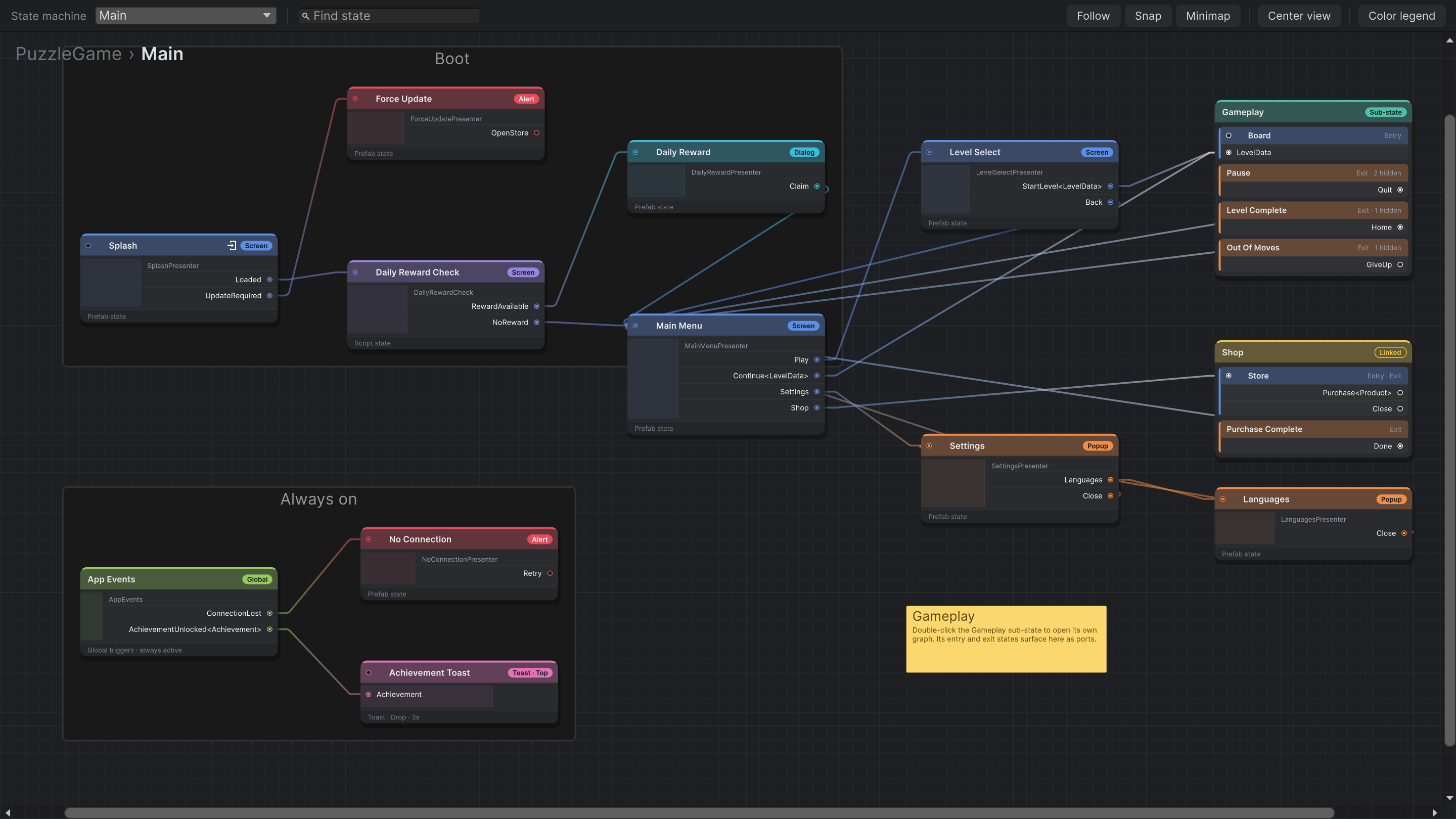
StateFlow is a visual state machine for Unity UI. Every screen, popup, dialog and alert in your game is a state. Each way out of a state is a trigger: an event in its script that appears as a port on its node. You draw the flow between them in the StateFlow Editor, and a StateFlowManager in your scene runs it.
The flow lives in a graph, not in your scripts. A screen never names the screen that comes next, so you can rewire the game without touching code. And because triggers and payloads are typed, a broken connection shows up in the editor instead of at runtime.
Start here
Getting startedInstall, set up a scene and run your first flow in a few minutes.
SamplesNine small scenes, one for each core feature.
States & triggersThe two ideas everything else builds on.
Core concepts
LayersScreen, Popup, Dialog and Alert, and how they stack.
PayloadsTyped data carried from one state to the next.
TransitionsAnimate any connection with a script of your own.
LifecycleInitialize, Enter, Exit, Dispose, and when each runs.
Building flows
Script statesDecisions and logic steps with no visuals.
Sub-states & linked machinesFold big flows into boxes and reuse them.
ToastsNotifications outside the screen stack.
Global triggersApp-wide events raised from anywhere.
Spawned contentTriggers on prefabs you spawn at runtime.
State observerWatch the flow for analytics and tools.
Project setup
Resources & AddressablesHow states are loaded.
The StateFlow EditorEvery tool in the graph window.
Validation & build checksCatch problems before your players do.
Requirements
- Unity 6.5 (6000.5) or newer.
- uGUI (
com.unity.ugui) and Addressables (com.unity.addressables). The Package Manager installs both with StateFlow. - States are uGUI prefabs on a Canvas. Any render pipeline works.