
Validation & build checks
How StateFlow catches broken transitions and unloadable states.
A flow drawn in a graph can break when the code under it changes. StateFlow checks for that in three places, so problems show up in the editor or the build log instead of in your players' hands.
In the graph: invalid transitions
A transition is stored against the full type name of the script that declares the trigger, and the trigger's name. If you rename a trigger, rename or move a state's class, or remove the component from the prefab, the transition can't find its port any more. The editor leaves it out of the graph and lists it in an Invalid transitions panel, with the route it used to take, so you can reconnect it.
A state whose prefab or script can no longer be resolved is drawn as an invalid node rather than disappearing, so its place in the flow stays visible.
Renaming a trigger is the most common cause. If you rename one on purpose, reconnect its transitions in the graph straight away.
On the StateFlow Asset: loading problems
Select a StateFlow Asset to check that every prefab state and toast can be loaded with its load type. The inspector lists each problem, offers Fix for the ones it can repair, such as making State Assets Addressable or rewriting stale keys, and Recheck to run again.
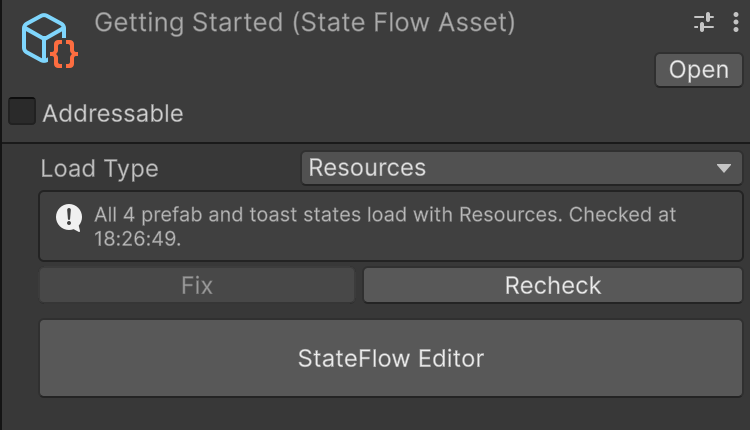
Before every build
When you build a player, StateFlow checks every StateFlow Asset in the project and writes each problem to the Console:
- An error for a state the player won't be able to load: a State Asset outside
Resourceswith Resources loading, or a State Asset that isn't Addressable, or is in an unusable group, with Addressables loading. - A warning for a state that loads but probably not the way you meant, such as an Addressables state that still sits in a
Resourcesfolder.
The build check only reports. It doesn't change anything, because Addressables content may already be built by then. Select the asset named in the message and use its inspector to fix it. Linked assets are checked through the assets that link them.
At runtime
- A graph without exactly one entry state throws when the StateFlow Manager starts, naming the problem.
- A StateFlow Manager with no asset, or with a layer container unassigned, logs an error on
Awake. - Raising a global trigger before any running graph has a node for it logs a warning.